Finance & Reports
Know last month's profit without opening Excel.
Room revenue, payroll, daily wages, expenses, and petty cash meet in one profit and loss report per property. You just read it and download it.
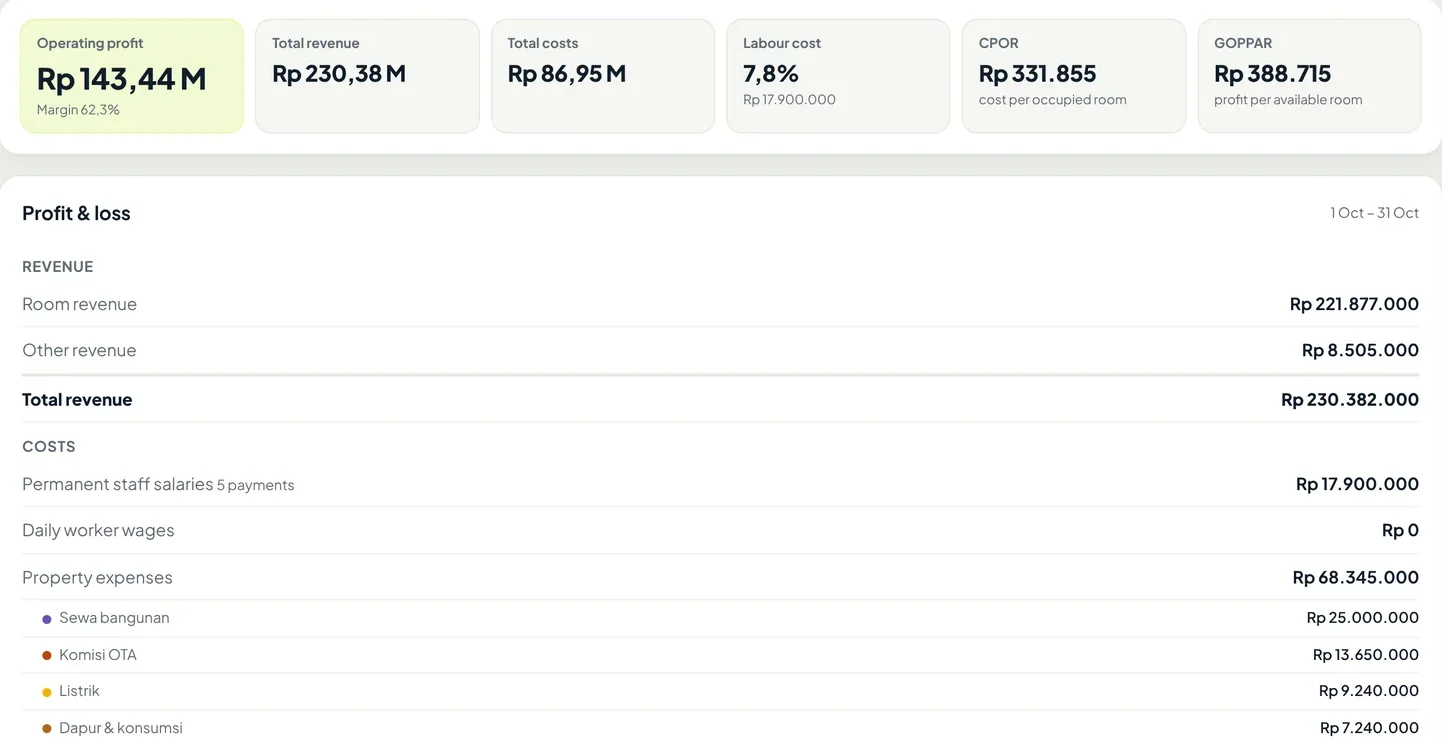
- Operating profit and margin for the period you choose, per property.
- Labour cost compared with revenue, from permanent payroll and daily wages.
- Payroll comes from finalised salary payments, so nothing is counted twice.
- Expenses are grouped by the categories you create yourself.
From receipt to profit
No number is typed twice.
Every rupiah is recorded once, where it happens, and then counted in the report. Here is one month from the demo account.
- Guest pays
- Booking
- Room & other revenue
RevenueRp 230,382,000
- Attendance & shifts
- Final payroll
- Paid
Permanent staff payrollRp 17,900,000
- Bills & purchases
- Receipt photo
- Expenses
Property expensesRp 68,345,000
- Small staff purchase
- Receipt photo
- Petty cash
Petty cash spentRp 701,000
Operating profit62.3% margin · download as PDF or CSVRp 143,436,000
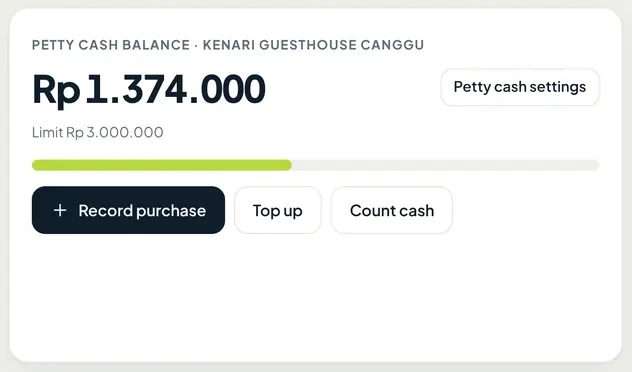
Petty cash
The cash in the drawer, recorded to the rupiah.
Every property has a petty cash balance with a limit. Staff record purchases and top-ups on their phones, then count the physical cash. Any difference shows up right away.
- Purchases are recorded with a receipt photo and a category
- Cash counts show whether the money matches or is short
- Owners or managers mark entries as Reviewed
Count by
One booking, four ways to read it.
Reports can count revenue by stay date, the date the booking was made, check-in date, or check-out date. Each one answers a different question.
Example booking from Agodamade 20 Sep · check-in 3 Oct · check-out 6 Oct · 3 nights × Rp 850,000
| One booking, four ways to read it. | 20 Sep | 3 Oct | 4 Oct | 5 Oct | 6 Oct |
|---|---|---|---|---|---|
| Stay datesDaily occupancy and ADR, the standard hotel way | Rp 850,000 | Rp 850,000 | Rp 850,000 | ||
| Book datesHow much you sold this week, for example after a promotion | Rp 2,550,000 | ||||
| Check-in datesRevenue arriving with your guests | Rp 2,550,000 | ||||
| Check-out datesUseful for matching final payments when guests leave | Rp 2,550,000 |
The total is the same all four ways. Only the date it lands on changes. This booking's lead time is 13 days (20 Sep to 3 Oct).
Agents & OTA commission
How much really comes in after commission?
The Agents report breaks bookings down by OTA and other sources, with commission and net revenue. This is a real view from the demo account.
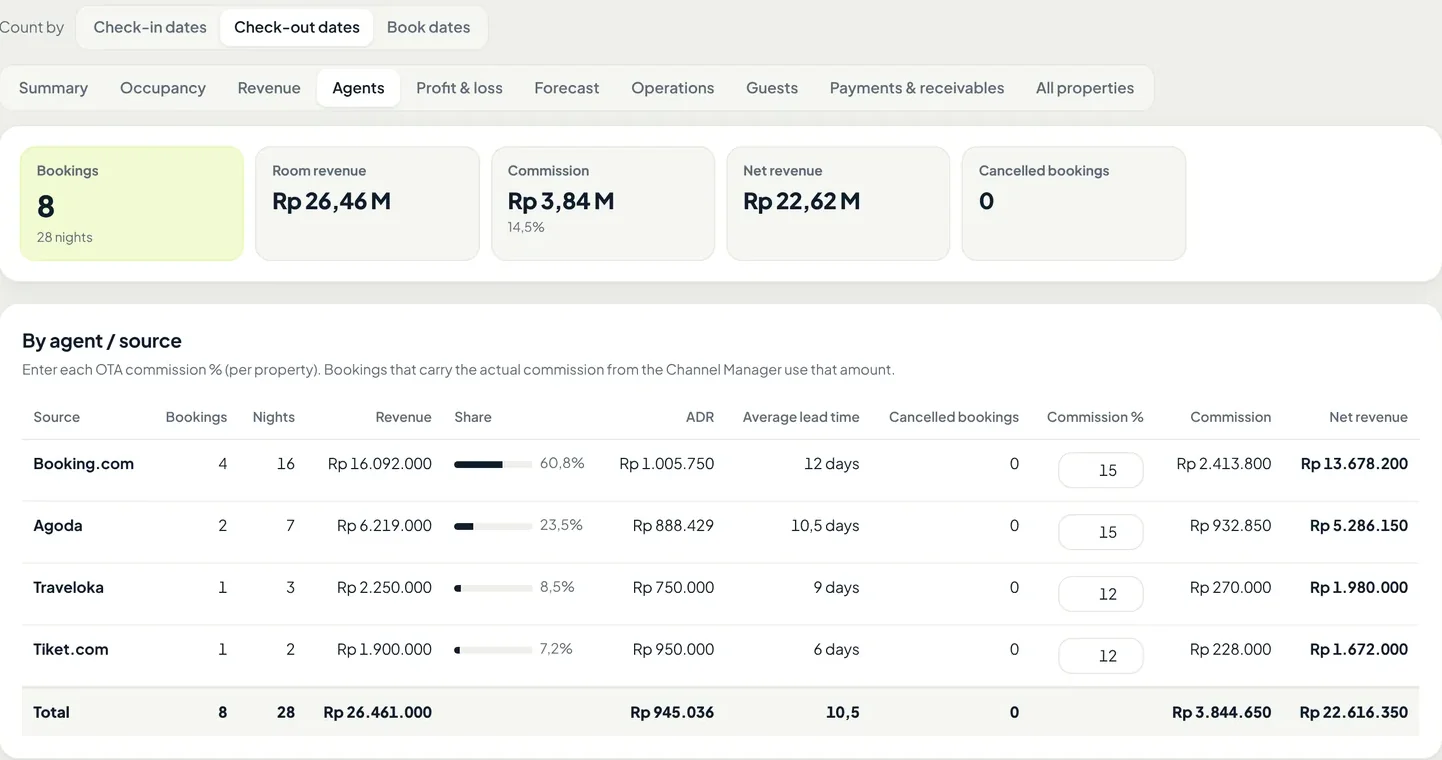
- Choose how to count, by check-in date, check-out date, or booking date.
- Average lead time per source, from booking to arrival.
- Enter each OTA's commission percentage once per property. When the channel manager sends the actual commission, that amount is used.
- Net revenue after commission, per OTA and in total.
How Oumah counts
Last month's numbers never change quietly.
A report is only useful if you can trust its numbers. These are the rules Oumah follows.
Days close every night
Each day's numbers are snapshotted at midnight. If an old booking is edited, past months stay the same.
Costs count when money leaves
Expenses, petty cash, and payroll land on their payment date, not the date they were created.
Payroll is never counted twice
Salary or daily wage payments that are automatically recorded as expenses only count in the payroll line.
Categories are yours
Electricity, laundry, OTA commission, or rent. You decide the categories, colours included.
Hotel numbers, explained
The terms in your report, in plain words.
The examples use Kenari Guesthouse's October data above (12 rooms, 369 available room-nights) and the Agoda booking example.
- OccupancyHunian
The share of rooms that were filled. Out-of-order rooms are left out.
Formularoom-nights sold ÷ room-nights available
Example262 ÷ 369 = 71%
- ADRAverage Daily Rate
The average price of one room per night, for rooms that were actually sold.
Formularoom revenue ÷ room-nights sold
ExampleRp 221,877,000 ÷ 262 = Rp 846,859
- RevPARRevenue per Available Room
Revenue per available room, empty ones included. It rises when either price or occupancy rises, so it is more honest than ADR alone.
Formularoom revenue ÷ room-nights available
ExampleRp 221,877,000 ÷ 369 = Rp 601,293
- CPORCost per Occupied Room
What you spend for every room you sell.
Formulatotal costs ÷ room-nights sold
ExampleRp 86,946,000 ÷ 262 = Rp 331,855
- GOPPARGross Operating Profit per Available Room
Profit per available room. It shows whether the property truly makes money, not just whether it is busy.
Formulaoperating profit ÷ room-nights available
ExampleRp 143,436,000 ÷ 369 = Rp 388,715
- Lead timeBooking to arrival
How many days ahead guests book. A short lead time means many guests book last minute, so prices close to the date matter.
Formulacheck-in date − booking date
Example3 Oct − 20 Sep = 13 days
What is included
Ten reports, one PDF button.
Pick a period and how to count, then open the report you need. Every report downloads as a PDF or as CSV for Excel.
Summary & comparison
Occupancy, ADR, RevPAR, revenue, and payments received, compared with the previous period and last year.
Occupancy
Occupancy by day and by room number, so rooms that rarely sell stand out.
Revenue
By day, by room type, and by source. Can be counted by booking date, with lead time, average length of stay, and cancelled booking value.
Agents & OTA commission
Bookings, revenue, lead time, commission, and net revenue per OTA and other sources.
Profit & loss
Revenue minus payroll, daily wages, expenses, and petty cash, by category.
Forecast & booking pace
Bookings already on the books for the next 30, 60, or 90 days, compared with 7, 14, and 30 days ago. Can be filtered by when bookings were made.
Operations
Attendance and lateness per staff member, room cleaning times, missed tasks, and damage reports.
Payments & receivables
Money received by payment method, every transaction, and the guests who still have a balance.
Guests
Who arrived, left, stayed, did not show, or cancelled on a given date.
All properties
Occupancy, revenue, costs, and profit for every property in one table, with totals.
Questions
About finance & reports.
Does Oumah replace an accountant?
No. Oumah records daily operations and builds management reports. For tax and formal bookkeeping, you can download CSV files and hand them to your accountant.
Who can see the reports?
Owners and managers. Staff only record purchases and petty cash at the property where they work.
Can I see all my properties at once?
Yes. The All properties tab shows occupancy, revenue, costs, and profit for each property, with totals.
Can I see net revenue after OTA commission?
Yes. Enter each OTA's commission percentage in the Agents report, once per property. When the channel manager sends the actual commission for a booking, that amount is used.
What if an old booking is edited?
Past days are locked every night, so last month's report does not change.
Can reports be switched off for a property?
Yes. The owner can switch reports on or off per property.
See the reports with sample data.
Open the demo to read the profit and loss, petty cash, and forecast, or ask us first on WhatsApp.